
Custom CRM software development means building a customer relationship management (CRM) system around the way your business finds, sells to and serves customers. Instead of renting a product like HubSpot or Zoho and bending your process to fit it, you get a tool made for your process, and you can own it.
For most small businesses, a ready-made CRM is the right place to start. A custom CRM starts to make sense when your team works around the software every day, when you pay for many seats or add-ons you barely use, or when your process is so specific that no product fits it well.
This guide shows how to tell which situation you are in, and how to plan a build well if you need one.
What is custom CRM software development?
A CRM is the place where your business keeps track of customers. It stores contacts and companies.
It shows every deal, call, email and task. It tells your team what needs to happen next and who should do it.
Custom CRM software development is the work of designing and building that system for one business. A development team builds the database, the screens and the rules. It also connects the CRM to the tools you already use, such as email, accounting software or the forms on your website.
Custom CRM vs off-the-shelf CRM vs a customized CRM
These terms get mixed up, so here is the difference:
- Off-the-shelf CRM: a ready-made product you rent, usually per user per month. HubSpot, Salesforce, Zoho CRM and Pipedrive are common examples. You can start using one within days.
- Customized CRM: the same ready-made product, set up to fit you. You add fields, change the deal stages, build automations and connect apps. This is what people usually mean by "CRM customization."
- Custom CRM: software built only for your business. You decide every screen, field and rule.
What a CRM actually does day to day
Here is a simple example. Picture a 12-person heating and cooling company. A homeowner fills in a quote form on the website.
The CRM creates a contact and a new deal. It assigns the lead to the salesperson who covers that ZIP code and gives them a task to call within an hour.
After the home visit, the quote goes out. If the customer accepts, the deal moves to "Won" and the job details go to the scheduling team. At the end of the month, the owner sees how many quotes turned into jobs.
The real question is how well a ready-made product fits your version of it.
Do you actually need a custom CRM?
Most businesses don't need one at first.
Signs your current tools no longer fit
- Your team keeps a spreadsheet next to the CRM because the CRM can't hold something they need.
- People type the same customer details into two or three systems.
- You pay for a higher plan mainly to unlock one feature.
- Your process has steps the CRM can't handle well, such as approvals, site visits or complex pricing.
- Many people only need a few screens, but each one still costs a full seat.
- Monthly reports take hours of copying and pasting into Excel.
One or two of these signs are normal. Several of them, every week, mean it is time to compare your options.
When customizing HubSpot, Zoho or Salesforce is enough
CRM customization means changing the settings of a product you already rent. You can usually add fields, rename pipeline stages, set up automation rules and control who sees what.
Try this first if your main complaint is "the screens and fields are wrong." It is cheaper and faster than building something new. The limit is that you can only change what the vendor allows, and some features need a more expensive plan.
When a low-code CRM is the better middle step
Low-code tools let you build simple apps with drag-and-drop screens and very little coding. They can work well for a small team with a simple but unusual process.
You still pay a subscription. You can only build what the platform supports. Moving your app to another platform later is often hard.
Another middle option is a white-label CRM: a ready-built platform that a developer adapts and brands for you. ELACTRO offers white-label software, including CRM platforms you can brand and adapt.
Decision table: four ways to get a CRM
| Factor | Ready-made CRM | Customized ready-made CRM | Low-code CRM | Fully custom CRM |
|---|---|---|---|---|
| Time to start | Days | Weeks | Weeks | Usually months, depending on scope |
| Upfront cost | Low | Low to medium | Low to medium | Highest of the four |
| Ongoing cost | Per-user subscription that grows with your team | Subscription, often a higher plan, plus admin time | Platform subscription plus time to maintain your apps | Hosting, support and updates; no per-user software fee |
| Fit to your process | Generic | Good, within the vendor's limits | Good for simple processes | Built to fit |
| Who owns the software | The vendor | The vendor | The platform | You, if your contract says so |
| Best for | New teams with a standard sales process | Teams with mostly standard needs | Small teams with simple internal tools | Specific processes, many users or deep integrations |
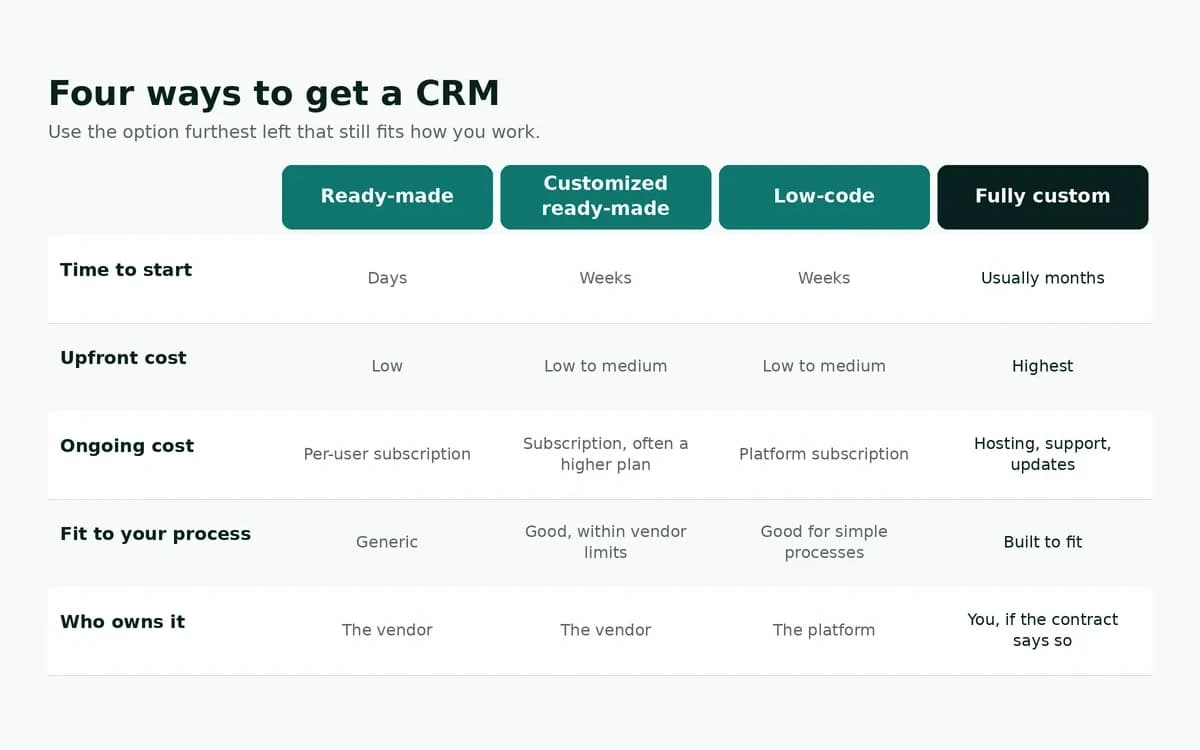
A simple rule: use the option furthest left that still fits how you work. Move right only when the option on the left is costing you real time or money every week.
If you would rather automate the steps between the CRM and your other tools than replace anything, that is often the cheapest fix of all. For a wider look at the same choice, read custom software vs SaaS.
Features a small-business CRM needs in its first version
A first version should solve your biggest problem well. It does not need every feature on day one. Developers call this an MVP, short for "minimum viable product": the smallest version that does real, useful work.
Must-haves
- Contacts and companies, with notes and a full history of calls, emails and meetings.
- A deal pipeline with your real stages, not generic ones.
- Tasks and reminders, assigned to named people with due dates.
- Roles and permissions, so each person sees and edits only what they should.
- Search and filters.
- Import and export to CSV files, so your data is never trapped.
- Email connection with Gmail or Microsoft 365, so messages appear on the right contact.
- A few key reports, such as pipeline value, deals won and lost, and activity by person.
- A change log that records who changed what, and when.
Features to leave for later
- A separate mobile app. Start with screens that work well on a phone browser.
- Email marketing campaigns.
- AI features.
- A customer portal where clients log in.
- Advanced forecasting and large dashboards.
A small first version costs less, launches sooner and teaches you what to build next.
How a custom CRM is built, step by step
Most projects follow five stages. Each stage produces something you can review before paying for the next.
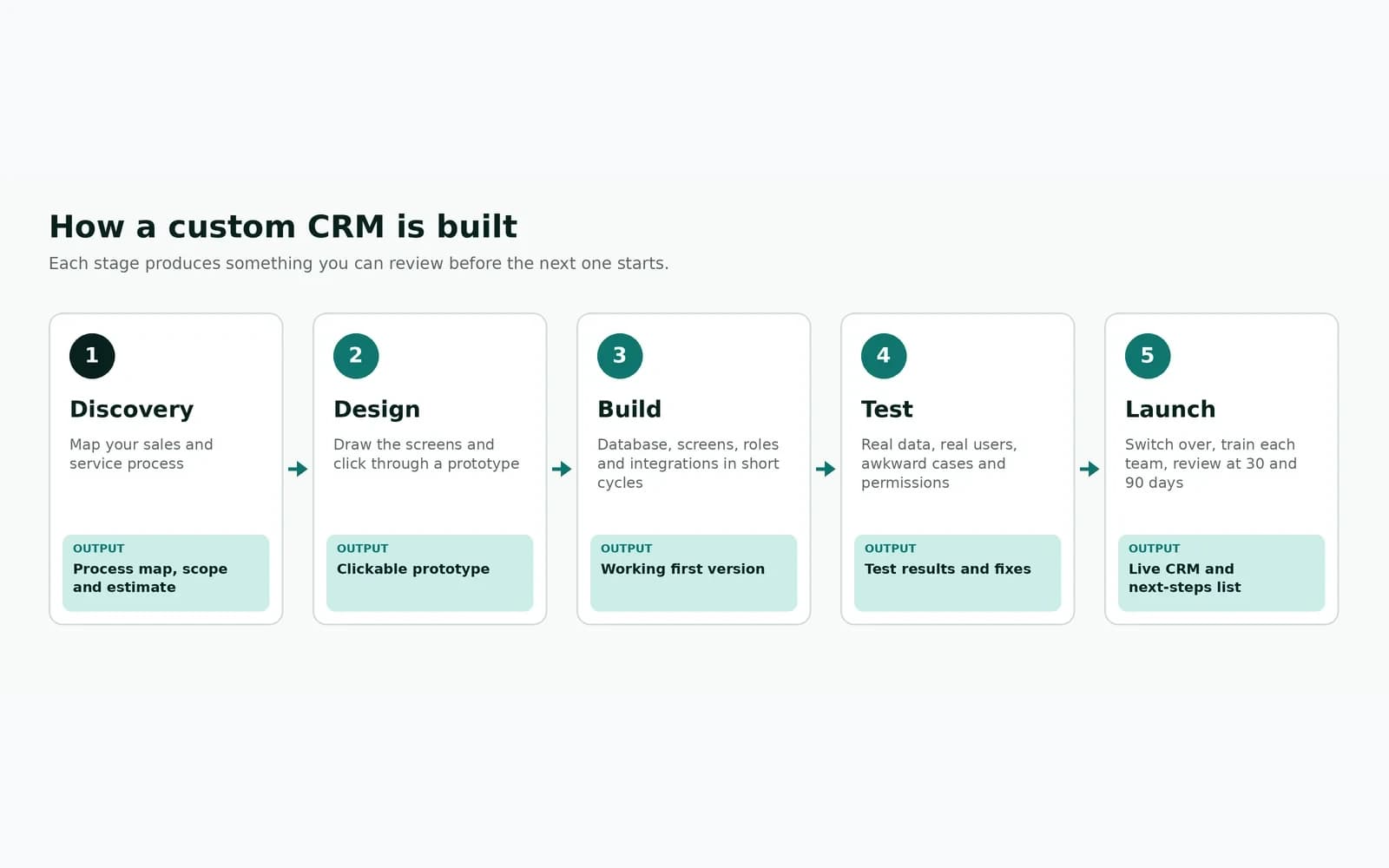
1. Discovery: mapping your sales and service process
The team learns how work really flows today, including the messy exceptions. They should talk to the people who use the system every day, not only the owner.
The result is a process map, a list of must-have features, a list of systems to connect and a written scope with an estimate. Bring real examples to these meetings: a typical deal, a difficult one and your current spreadsheet.
2. Design and a clickable prototype
Designers draw the main screens and link them into a prototype you can click through before any code is written. Ask a few of your salespeople to try it.
Changing a drawing takes minutes. Changing finished software takes much longer. This is why the first weeks after launch always surface small issues — plan reviews at 30 and 90 days to fix them and decide what to build next.
How much does custom CRM software development cost?
There is no honest single number. The price depends on what you need, and a fair estimate only comes after someone has studied your process.
What drives the price
- User roles and permission rules. More roles and rules mean more work.
- Integrations. Each connected tool, such as QuickBooks, Gmail or your website, adds its own work.
- Data migration. Clean data from one spreadsheet is quick. Messy data from five sources is not.
- Reports and dashboards. Many custom reports cost more than a few standard ones.
- Automation and approvals. Each rule needs building and testing, including the exceptions.
- Mobile. A phone-friendly web app costs less than separate iPhone and Android apps.
- AI features. These add build work and ongoing usage fees.
- Sensitive data. Health or financial data needs extra security work.
A CRM is a type of custom web application, so the same cost drivers apply to most business software.
Running costs after launch
Custom software is not free after launch. Plan a yearly budget for:
- Hosting, backups and monitoring
- Security updates and bug fixes
- Small improvements your team asks for
- Third-party fees, such as email sending, SMS or AI services
Ask every developer for a written estimate of yearly running costs, not just the build price. ELACTRO's maintenance and support service covers this kind of ongoing work.
A 3-year worksheet: subscription vs build
The table below shows official list prices for one mid-level plan from four popular CRMs. We checked each vendor's pricing page on 21 October 2026. Prices change often, so check again before you decide.
| CRM plan | List price per user per month | Other fees shown |
|---|---|---|
| HubSpot Sales Hub Professional | $90 billed annually ($100 billed monthly) | $1,500 one-time onboarding |
| Salesforce Pro Suite | $100, billed annually | None shown on the base plan |
| Zoho CRM Professional | $23 billed annually ($35 billed monthly) | Local taxes extra |
| Pipedrive Growth | $39, billed annually | Prices exclude VAT |
Sources, checked 21 October 2026: HubSpot Sales Hub pricing, Salesforce Sales Cloud pricing, Zoho CRM editions and Pipedrive pricing.
Illustrative calculation. Here is what those list prices add up to over 36 months, using annual billing.
This is simple arithmetic, not a quote. It leaves out taxes, add-ons, paid integrations and future price rises, and the four plans do not include the same features.
| CRM plan | 10 users, 3 years | 25 users, 3 years |
|---|---|---|
| HubSpot Sales Hub Professional (incl. onboarding fee) | $33,900 | $82,500 |
| Salesforce Pro Suite | $36,000 | $90,000 |
| Pipedrive Growth | $14,040 | $35,100 |
| Zoho CRM Professional | $8,280 | $20,700 |
For the custom side, use one simple formula with real quotes: 3-year custom cost = build cost + (yearly running cost × 3).
How to read the two together:
- A 25-person team that needs HubSpot Sales Hub Professional is looking at about $82,500 in list-price subscriptions over three years. A custom build only wins on cost if its build cost plus three years of running costs comes in below that, for the features that team actually needs.
- A 10-person team that is happy on Zoho CRM Professional (about $8,280 over three years) will rarely save money with a custom build. If they build, it should be because of fit, not price.
- After year three, the subscription keeps going. A custom CRM still has running costs, but the build is already paid for.
Moving your data without losing it
Data migration means moving your existing customer records into the new CRM. It is the step that most often causes trouble, so plan it from the first week, not the last.
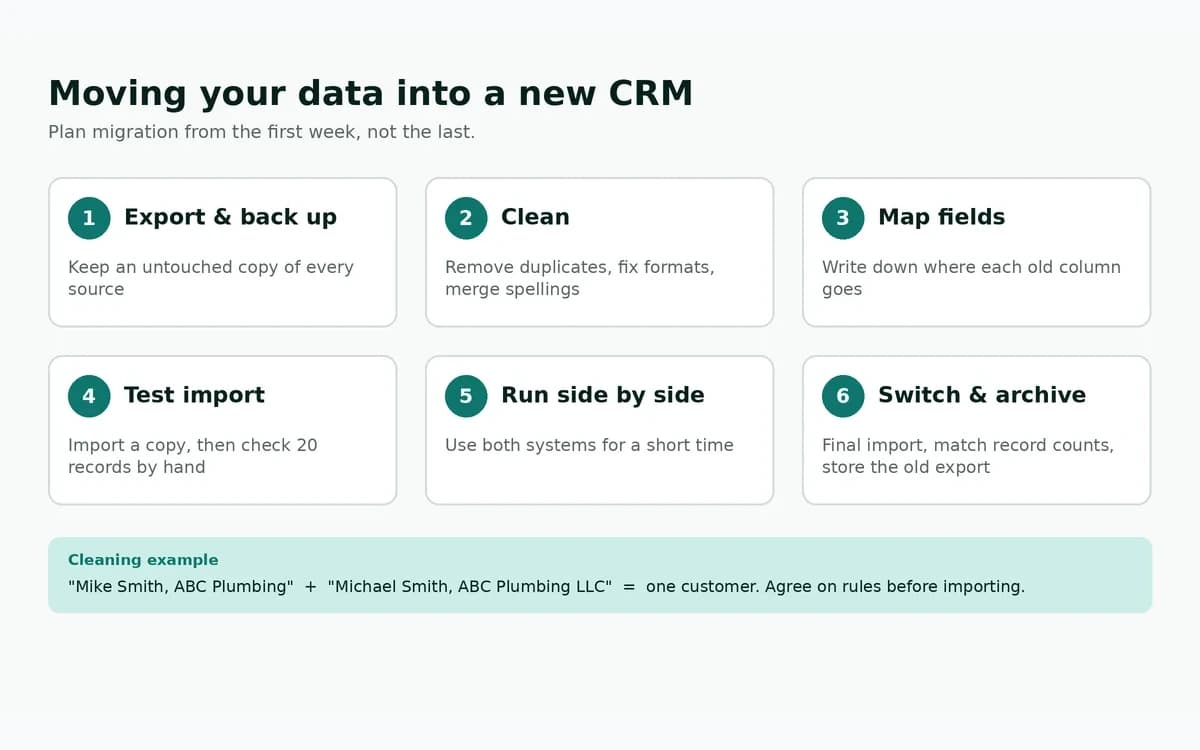
Data migration checklist
- List every source. Spreadsheets, the old CRM, email inboxes, your accounting tool and any paper records.
- Export everything and keep a backup. Save an untouched copy before anyone cleans anything.
- Clean the data. Remove duplicates, fix phone and email formats, and merge companies spelled in different ways.
- Map the fields. Write down where each old column goes in the new system. "Cell" and "Mobile" might become one "Phone" field.
- Decide what to leave behind. Very old leads that never replied may not be worth moving.
- Test the import on a copy. Then pick 20 records at random and check them by hand.
- Run both systems side by side for a short time if you can.
- Switch over. Freeze the old system, run the final import and check that the record counts match.
- Archive the old export somewhere safe.
A common example: "Mike Smith, ABC Plumbing" and "Michael Smith, ABC Plumbing LLC" are probably the same customer. Agree on rules for cases like this before the import, not during it.
Security, access and code ownership
Your CRM holds some of your most valuable data: customer names, phone numbers, deal values and notes. Treat its security as a core feature, not an extra.
Who sees what: roles and permissions
Give each person only the access their job needs. Sales reps see their own deals.
Managers see their team's. Only a few admins can export everything.
When someone leaves, their access should end the same day. Sign-in should support two-step verification. Our guide to building secure sign-in systems explains these basics in plain terms.
The U.S. Federal Trade Commission's Start with Security guide is a free, plain-English list of lessons for any business handling customer data.
Developers often use the OWASP Top 10, a widely used list of the most common web application security risks. Ask any developer how they handle each one.
Backups and audit trails
Set up automatic daily backups, stored separately from the live system. Then test that a backup can actually be restored.
An audit trail is a record of who created, changed or deleted each record, and when. It helps you fix mistakes and answer questions like "who changed this price?"
Making sure you own the code and data
With a custom CRM, your ownership is only as strong as your contract. Before you sign, confirm in writing that:
- You own the source code and the database.
- The code repository and hosting accounts are in your company's name, or will be moved to it.
- Documentation is part of the delivery.
- Nothing is licensed back to the developer or locked to their servers.
At ELACTRO, these ownership terms are set out in the project contract before work begins — confirm them in writing, the same as you would with any developer.
Adding AI to a custom CRM, carefully
AI can save time inside a CRM, but it should help people, not replace their judgment. Useful, realistic uses include:
- Summarizing a long email thread or call notes before a meeting.
- Drafting a follow-up email that a rep edits and sends.
- Spotting contacts that are probably duplicates.
- Pulling details from an incoming email or form into the right fields.
Three rules keep this safe. Keep a person in charge of anything sent to a customer or anything involving money.
Know what data goes to the AI provider and under which terms. Start with one use case and measure whether it really saves time.
If you want to go further, read what AI agents can and can't do, or see how ELACTRO approaches AI software development.
Common mistakes to avoid
- Copying a broken process into new software. Software makes a clear process faster. It makes a messy one fail faster.
- Building everything at once. A huge first version takes longer, costs more and is harder to change.
- Not involving the daily users. If salespeople aren't asked, they often go back to their spreadsheets.
- Choosing on price alone. The cheapest quote often leaves out discovery, testing or migration.
Questions to ask before you hire a developer
These questions help you compare developers fairly:
- Can you show me a similar system you have built, live or in a demo?
- How will you learn our process before giving a final price?
- What is in the first version, and what is not?
- How often will we see working software?
- Who will own the code, the database and the hosting accounts?
- How will you move and check our existing data?
- How do you handle security, backups and access for staff who leave?
- What will it cost each year to run and support?
- What happens if we stop working together?
Vague answers to questions 5, 8 or 9 are a warning.
Final thoughts
Custom CRM software development pays off when your process is specific, your team is growing and your current tools create daily workarounds.
If you do build, start small, plan your data move early, protect access and own what you pay for.


